
Memory upgrades for Lenovo S10e, Aspire M5201, eMachines T6212

Last month my Gateway GT4014j suddenly died and I replaced it with an Acer Aspire M5201, which came with 2 GB of memory installed. That was less than the 3 GB I had in the Gateway and it affected some very memory hungry apps I use. So three weeks later I did a memory upgrade – a series of upgrades to be more precise. I bought two sets of memory upgrades and upgraded three machines.

In my experience, most computers don’t become obsolete because of CPU clock speeds that are too slow but because either there is too little main memory (RAM) for newer, more demanding (i.e. more bloated) applications or because the machine runs out of disk space. The latter used to be more of a problem than it is now, because of the availability of external USB drives, but lack of RAM is still a problem.

Giving your computer enough memory usually is the best way to give it a performance boost because insufficient memory will result in disk swapping. Without enough memory your applications will spend more time waiting for data to get swapped to and from disk, which slows even the fastest CPU down to a crawl such that even a medium or low end CPU with sufficient RAM could run circles around it.

When Vista came out, many manufacturers still sold 512 MB configurations with Vista Home Basic, while advertising mainly the processor speed. Buyers would have been far better off picking a somewhat slower CPU but equipped with a whole GB of RAM. The same is basically still true today for 1 GB machines (usually with Vista Home Premium) vs. 2 GB machines: More main memory almost always beats more Gigahertz!

Back to my Aspire M5201: It has four DIMM sockets (2 banks) for up to 8 GB of memory (2GBx4), but unless you run a 64-bit operating system such as a 64-bit Linux, Vista 64-bit or (from 22 Oct 2009) Windows 7 64-bit, you can’t actually make use of more than 4 GB. Therefore I opted to go as far as 4 GB only for two 1 GB DDR2 PC2-6400 DIMMs from Crucial Technology (CT12864AA800, from Tsukumo.co.jp). They were 1,980 yen each (about US$22) including sales tax.

I also ordered one 2 GB DDR2 PC2-5300 SODIMM (CT25664AC667) for 3,800 yen (about US$42) for a Lenovo IdeaPad S10e. The S10e is a typical Atom N270 netbook with 1 GB of RAM. One 512 MB SODIMM base memory is soldered in while the other can be replaced with either a 1 GB or 2 GB SODIMM. You end up with 1.5 GB or with 2 GB (not 2.5 GB because the 945 GSE chip set is not capable of addressing more than 2 GB of total memory). The Intel Atom itself supports up to 4 GB, which is why nettops with the NVIDIA Ion chip set such as the Acer Revo 3600 can handle up to 4 GB of RAM. The memory upgrade went very smoothly, especially the netbook. The Acer Aspire M5201 (AMD 780G chip set) now shows 3.75 GB of RAM in Windows while the Lenovo shows 1.99 GB.

Encouraged by that I removed the 1.5 GB of DDR DIMMs from my 2005-vintage eMachines T6212 and transplanted the 3 GB of DDR DIMMs (1 GB x 2 and 512 MB x 2) from the dead Gateway GT4014j to it. DDR memory was superseded by DDR2 3 years ago, but now that old machine that originally came with 512 MB shows 2.75 GB of memory in Windows.

If you’re not sure what memory is right for your machine or how much memory you can fit, Crucial have a convenient Memory Finder application that will figure it out for you.
IE7, IE8 and .exe files on network drive: “The publisher could not be verified…”

I recently upgraded a Windows XP machine from Internet Explorer 6 to IE 8. Since then I’ve been getting warnings whenever I wanted to run any .EXE file that doesn’t use code signing off a network drive.

My main browser on that machine is FireFox, but that doesn’t matter. The warning that comes up is the following:

The publisher could not be verified. Are you sure you want to run this software?

Apparently the same behaviour was already introduced when upgrading to IE 7. It may also happen with Service Pack 3 (SP3) for XP. Unlike for the similar query that happens for executable files downloaded off the Internet, there is no option to turn off the warning for a specific .EXE file.

There is however a way to allow all unsigned EXEs to run off a given network drive or network server without the warning. Here is what you do:

Open the Control Panel, select Internet Options, click the Security tab, select Local intranet, click Sites and the Advanced button. Add any server (e.g. \\myserver) by entering the name and clicking Add. The resources will be added as file://myserver. When you’re done click Close and OK.

This will allow all unsigned applications on the listed servers to execute without security prompt just as if they were on your local machine.

Toyota and Lexus floor mat recall (unintended acceleration problems)

Toyota Motors and and the US National Highway Traffic Safety Administration (NHTSA) recently announced a recall of 55,000 floor mats for various Toyota and Lexus models following an investigation into a crash of a Lexus ES 350 on 28 August 2009 that killed a 45 year old police officer and three family members. The car sped out of control and finally hit another vehicle. Suspicions center on an All-Weather floor mat that could have got entangled with the accelerator pedal.

Floor mat problems in cars are not that uncommon. My previous car was an Audi A4 and there the mats provided by the dealer (it was a second hand car) did not fit the nipples meant to match up with holes in the mats. As a result, the driver side mat always kept sliding forward under heel pressure and sometimes ended up under the pedals (luckily never over the pedals!). One day my wife and I wondered why the car suddenly had a hard time accelerating (it felt really sluggish), until I realized what had happened and pulled the thick mat back out from under the accelerator pedal, which could not be depressed properly (presumably braking would have been similarly affected, but luckily I did not have to find out).

The opposite problem of unintended acceleration tends to be far more severe than a lack of acceleration, of course. An accelerator stuck on full throttle is something that happened to me once while driving a VW Santana, back in the 1980s.

That 5 cylinder engine still used a carburetor, not fuel injection. At some point the cold start enrichment mechanism of the carburetor developed a problem. I reported this issue to the dealer before a service and asked them to fix it. I don’t know what they did about it, but the next weekend I took the car on a German autobahn and had a very unpleasant incident where it got stuck at full throttle while I was doing over 160 kph (there was no speed limit there).

I found that the car kept accelerating even if I took my foot off the pedal and reached about 180 kph. I then pushed the brake pedal as hard as I could and at least it didn’t accelerate any further and slowed down a little. I depressed the clutch pedal (the closest manual equivalent of putting it into Neutral). Without any load on the engine, the RPMs shot up to the max but were limited by the engine management. With the engine roaring at maybe 5800rpm, the car coasted on the straight road and the brakes could slow it down. Worried about the engine I then switched off the ignition, which did stop the engine but also disabled the brake servo and power steering. I quickly turned the ignition back on, but not far enough to engage the starter, just so the steering lock could not be activated by turning the steering wheel as it would with the ignition completely off. I finally brought the car to a complete stop on the hard shoulder, without brake servo assistance.

After opening the bonnet, I opened the carburetor with a screw driver from the emergency set in the back and found the butterfly valve stuck. After some prodding with my fingers, it went back to the proper position and I could resume my journey, with no further incident.

I can see that using the brake pedal, my first reaction in that situation, would not have been as effective in a 3.5 litre V6 Lexus as it was in my 2 litre VW, because the engine was far more powerful. Switching the car to Neutral, my second reaction, would have been quite effective in the Lexus though. My third reaction, switching off the engine, would have been quite impossible for the average driver in that loan car. Turning off an ignition key is one thing, but having to hold down the power button for three seconds (as in that Lexus and some other cars that use a start button instead of an ignition key) rather than just pushing it once is anything but intuitive. Yes, mobile phones and computers can be shut down that way too, but most of us grew up with cars that behaved differently from today’s computers. Actually, even when I started with computers they switched off as soon as you pushed the power button once. I can see how the driver would push the power button once to turn it off and nothing would happen. Then what?

If the driver missed his chance to shift the gear into N, he would likely run out of time in that car before hitting another vehicle in front, before he would have figured out how this is supposed to be done.

Most accidents occur due to a combination of errors. In this case it appears to have been the floor mat problem, combined with the driver missing the chance to respond effectively by shifting the gearbox to N.

Problems with stuck accelerators could have been ameliorated in the engine management by having the brake pedal override accelerator input. If for example the brake pressure was high enough for an emergency stop (the ABS has a sensor for that) then the fuel injection quantity could be limited to idling or at least significantly less than full acceleration would demand, effectively ignoring the accelerator, floor mat or no floor mat. The only side effect I can see is that it would make drag racer starts impossible.

When I explained about the recent Toyota problem to my wife, she replied that she had tried to remove the mats from our 2008 Prius for cleaning but didn’t manage to because the hooks held them in place too firmly. Even without the hooks I imagine the left foot rest in the Prius would stop the mat from moving much.

Whatever car you drive, make sure the floor mat is secured against sliding around. If you’re not sure, better get rid of it altogether. And if you should ever find yourself with a car accelerating out of control for whatever reason, remember that the N position of an auto box or clutch pedal of a manual will always disconnect the engine from the gearbox, not matter what causes the engine power to surge.

Acer Aspire M5201-A32 (RS780G / HD 3200 based)

Since last week I have a new computer, after my old Gateway GT4014j died after three years of constant use. It had greeted me with a Blue Screen of Death on a sad Monday morning. If I rebooted, the machine would always lock up again within minutes: Bad news!

I hooked up the main drive (a 250 GB SATA) to another machine via the NewerTechnology USB 2.0 Universal Drive Adapter, the Swiss army knife of drive adapters. During a disk scan the drive would hang too. A few days later I was able to copy off most of the data via the USB cable, so I didn’t really lose any important data, but reinstalling and reconfiguring everything cost me several days.

With the bad drive I could either go out and buy just a new drive for the old machine, or pick up a complete new machine. In the end I chose the latter: The old machine had been working very hard for three years and if I had to reinstall the operating system and other software anyway, I felt safer starting with fresh hardware and not an old motherboard or power supply that might burn out not too long after.

Welcome to my new box, an Acer Aspire M5201-A32, which cost me 44,800 yen (about US$400) at Nojima.

Since 1995 I’ve had 3 eMachines and then 2 Gateways (Gateway acquired eMachines). It’s pure coincidence that the new machine is an Acer, which acquired Gateway in 2007. I like reasonably well built machines that use standard components and are not too expensive. For software development and testing as well as typical internet-related tasks I don’t really need high end CPUs that are expensive, power-hungry and require big, noisy cooling fans.

I picked the Acer not only because it was inexpensive but also because it’s based on the AMD 780G chipset which has a good reputation for power efficiency and decent performance for an on-board video chip (I’m not a gamer, so I don’t need high end graphics performance). The on-board video is called a Radeon HD 3200 which is very similar to a Radeon 2400 discrete video card.

On the net I found virtually no information about what motherboard Acer uses in this model, but it appears to be the same Foxconn (Bengal) RS780 Motherboard used in several Gateway models, such as the DX4200, GT5694, GT6576 and GM5688E. Acer / Gateway doesn’t provide any drivers for operating systems other than Vista, but the 780G chipset is well supported and there are plenty of other suppliers of similar boards. Right now everything except the sound chip is recognized and working under Windows 2003, but I hope to fix that too.

The machine has both a 15 pin VGA and a HDMI connector, which can be used with dual monitors. I verified that with just one monitor but two cables, switching the monitor input between the two connectors and seeing the two logical screens of the desktop, but normally I only use the HDMI output hooked up to a single 24″ Dell monitor (2408WFP).

There are 6 SATA connectors on the motherboard and the case has room for 6 internal 3.5″ devices (one of which is used for the memory card slot) and two external 5.25″ devices, one of which is taken by the Lite-On DH-16A6S (DH16A6S) DVD-RAM drive. The 300W PSU has four SATA power connectors, two of which are still available.

The machine came with a workable 2 GB of PC2-6400 (DDR2-800, 2x1GB) RAM taking up 2 of the 4 memory slots. The maximum supported is 8 GB. I will probably just get another 2x1GB for about another $30.

UPDATE 2009-09-26: The “Audio Device on High Definition Audio Bus” that ends up in “Other devices” under the Device Manager looks like the audio output supported by the HDMI video interface. Windows 2000, Windows XP and Windows 2003 do not include a driver for it. It can be downloaded from Microsoft as a hotfix. Since my monitor doesn’t have speakers, I won’t really be needing that driver.

Chevy Volt 230 mpg claim is misleading

On August 11, 2009 GM made media headlines by claiming that using EPA methodology its Chevy Volt hybrid vehicle was capable of getting a city driving fuel economy rating of 230 miles to the gallon. That’s 98 km/l or 1.02 l/100 km to those of us on the rest of the planet who use the metric system. The next day the EPA poured cold water on GM’s claims: “The EPA has not tested a Chevy Volt and therefore can’t confirm the fuel economy values claimed by GM.” Relatively few articles took the trouble of dissecting GM’s claims for plausibility.

In reality any mpg figure for this type of vehicle is essentially meaningless because unlike mpg figures for other cars it is highly dependent on how far one drives the Volt between recharges. Volt uses a lithium ion battery with a theoretical capacity of 16 kWh that powers the car for about 40 miles (64 km), depending on driving conditions. Once the battery reaches its lower charge limit, a 4 cylinder gasoline engine kicks in to power a generator to provide electricity for driving. GM calls this internal combustion engine (ICE) the “range extender”.

Do less than 40 miles between charges and the Volt won’t burn any gasoline. Its mpg rating would be infinite, because its only fuel is measured in kWh and shows up on your electric utility bill. Once you exceed the 40 mile limit you will start burning gasoline at a yet unknown rate. The Wikipedia article on the Volt mentions a figure of 50 mpg, almost the same as the third generation Toyota Prius. I am a bit skeptical about that number, given the Prius uses an efficient mechanical transmission that connects the engine directly to the wheels via planetary gears, while the Volt first converts the mechanical power from the engine into electricity and then an electric motor converts the electric power back into mechanical power. Neither process is 100% efficient. Also, at 170 kg the Volt’s lithium ion battery weighs some 125 kg (280 lbs) more than the Prius’ much smaller 45 kg nickel metal hydride (NIMH) battery. This weight difference is not exactly going to help the Volt match the Prius’ fuel economy in city driving, where weight is a major determining factor.

For argument’s sake, let’s assume that the Volt does indeed get 50 mpg while running on the engine, after 40 miles on battery power. So what’s the total test distance in GM’s calculation that it used as the basis for its claim? The portion run on gasoline would be 50/230 of it and the 40 electric miles would be the remaining 180/230. From that we can calculate that the total distance is about 51 miles (40*230/180), of which 11 are on gasoline. You would get 230 mpg only if you happen to go 51 miles between recharges. On the other hand, it could be 83 mpg at 100 miles between charges or even 2550 mpg at 41 miles. Pick your number 😉 It really won’t tell you anything until you also factor in your driving patterns and the cost of domestic electricity for recharging where you live.

Americans basically like big numbers and a figure of 230 mpg sure is eye catching, but it doesn’t really tell you much until you study all the details. Here’s another big number: $40,000. That’s about how much GM is going to charge for the Volt from late 2010 or early 2011, when it’s supposed to go on sale. $15,000 more than a 51 mpg (EPA city rating) Prius III is tough to justify economically: Even at $5 per gallon it would buy 3000 gallons or probably around 120,000 miles at a conservative 40 mpg and no electric bill. It remains to be seen how the brand new lithium ion batteries in the Volt will hold up over time compared to the tried and tested NiMH batteries used in the Prius for the last 12 years. The Prius batteries are backed by an 8 year warranty and there are cars that have done 400,000 km (250,000 miles) on the first traction battery.

The 230 mpg claim is dishonest. They could simply say: “It doesn’t use any gasoline for about 40 miles and after that it gets 50 mpg (or whatever number).” That wouldn’t be too hard to understand for anyone and wouldn’t raise any unrealistic expectations. GM doesn’t even mention what fuel economy the car gets while running on the range extender.

I have to agree with those who charge that GM designed the Volt less as a viable competitor in the low-carbon automobile market than as a clever insurance policy to make a bailout at US tax payers’ expense more palatable to the public. Its technology sounds exciting, but it’s a farce. The main piece of new technology that goes into the car – its lithium ion batteries – will be made by LG in Korea. The rest of the car is basically the same platform as the Chevrolet Cruze and its European sibling, the Saab 9-3.

Let’s remember that Toyota launched the first generation Prius in Japan back in 1997. GM didn’t see the writing on the wall then: Even two years later it went out and bought the Hummer brand. Over the following decade it saw its own market capitalization drop from over $50 billion to essentially zero and would be dead by now but for the assistance of politicians too scared to see GM and its supply chain fail while the country was still heading into the worst recession in decades. Keeping the Volt alive all this time made political sense for GM, whatever the real merits of the project.

Setting file dates from EXIF data for JPEG files

I just came back from a fabulous 6 day trip to Utah, Arizona and Nevada with my family, retracing a tour there back in 1992 inspired by reading Edward Abbey’s “The Monkey Wrench Gang” which is set in the Four Corners area of the Southwestern USA. The Grand Canyon (North and South rim), Monument Valley, Zion National Park and Antelope Canyon were the main highlights of the journey.

We had three digital and one analog camera with us, as well as two laptops for backing up picture data. At home I found that some picture sets from my daughter’s camera had somehow lost their file time stamps, probably from something that went wrong when the JPEG files were copied to my son’s Lenovo S10E netbook (nice machine, BTW). This made sorting the pictures in chronological order difficult. A quick Google search found a solution. ExifTool (which is free software written by Phil Harvey) lets you set the last modified date of the file system to the date the picture was taken, which is stored in the EXIF data of the JPEG file by virtually any digital camera. Simply create a folder with all the JPEGs and run this command:

exiftool "-DateTimeOriginal>FileModifyDate" myjpgfolder

Voila! All the .jpg files in the folder will have the date again when they were taken. This also allows you to set the file date to the exact second. Typically memory cards for digital cameras are formatted as FAT which truncates creation times to even seconds, as it’s one bit short for storing the time more precisely than at 2 second intervals.

Domain appraisal scam

Be careful if you receive an email like the following:

We are interested to buy your domain name YOUR-DOMAIN-HERE and offer to buy it from you for 80% of the appraised market value.

As of now we accept appraisals from either one of the following leading appraisal companies:

– fleos.com
– sedo.com

If you already have an appraisal please forward it to us.

As soon as we have received your appraisal we will send you our payment (we use paypal for amounts less than $2,000 and escrow for amounts above $2,000) as well as
further instructions on how to complete the transfer of the domain name.

We appreciate your business,

Yours truly,

Mark Evans

The offered percentage or the alias of the sender may be different. The list of appraisal companies may vary too and the catch is in the requested appraisal: Whereas sedo.com is a well established company dealing in domain resale and appraisal, domains fleos.com, flyrating.com and others are new:

Domain Name: FLEOS.COM
Registrar: WEB COMMERCE COMMUNICATIONS LIMITED DBA WEBNIC.CC
Whois Server: whois.webnic.cc
Referral URL: http://www.webnic.cc
Name Server: NS1.EZYDOMAIN.COM
Name Server: NS2.EZYDOMAIN.COM
Status: clientDeleteProhibited
Status: clientTransferProhibited
Status: clientUpdateProhibited
Updated Date: 04-jul-2009
Creation Date: 04-jul-2009
Expiration Date: 04-jul-2010

Registrant Contact:
Modern Outlook Sdn Bhd
Modern Outlook Sdn Bhd (reg_460127@whoisprotection.cc)
Lot 13-01A, Level 13 (East Wing) Berjaya Times Square, No.1, Jalan Imbi
Kuala Lumpur, Wilayah Persekutuan, Malaysia 55100
P: +603.21491999 F: +603.21431685

This one was used earlier than in the above sample:

Domain Name: FLYRATING.COM
Registrar: WEB COMMERCE COMMUNICATIONS LIMITED DBA WEBNIC.CC
Whois Server: whois.webnic.cc
Referral URL: http://www.webnic.cc
Name Server: NS1.EZYDOMAIN.COM
Name Server: NS2.EZYDOMAIN.COM
Status: clientDeleteProhibited
Status: clientTransferProhibited
Status: clientUpdateProhibited
Updated Date: 26-may-2009
Creation Date: 26-may-2009
Expiration Date: 26-may-2010

Registrant Contact:
Modern Outlook Sdn Bhd
Modern Outlook Sdn Bhd (reg_449229@whoisprotection.cc)
Lot 13-01A, Level 13 (East Wing) Berjaya Times Square, No.1, Jalan Imbi
Kuala Lumpur, Wilayah Persekutuan, Malaysia 55100
P: +603.21491999 F: +603.21431685

Notice how they’re both registered via the same registrar. If anyone checks out the fees they’ll find that not coincidentally these no-names charge less than Sedo.com for their service, so they might easily get picked by domain owners hoping to make quick cash.

Your guess is as good as mine who sends out those buy offer spams that drive business to those cookie cutter domain appraisal firms, who take $22.95 from anyone falling for this scam.

Unless you enjoy getting scammed, avoid any domain purchase offer in which the would be buyer does not come up with an offer price on his own but asks you to get an appraisal from a third party and promises to pay you a percentage of the appraised value!

Other “appraisal company” domains used:

  • nameorange.com
  • pedma.com
  • pozde.com
  • podzz.com
  • domainexplorer.org
  • pddomains.com

See also:

Last updated: 2009-08-10

NewerTech USB 2.0 Universal Drive Adapter

If you find yourself needing to read and write hard disks from other computers and do not always want to transplant them into a computer or an empty USB drive chassis, the NewerTech USB 2.0 Universal Drive Adapter is a great solution. It handles just about any format:

  • 3.5″ SATA (1.5 or 3.0 GBps, Molex or SATA power connector)
  • 3.5″ parallel ATA
  • 2.5″ SATA
  • 2.5″ parallel ATA
  • 5.25″ parallel ATA optical drives (CD/DVD/Blueray – but not notebook drives!

Its 100-240V, 50/60 Hz universal power brick is usable worldwide. All necessary cables are included (ATA ribbon cable, SATA, USB, power cables).

Using a hard disk on any USB-equipped computer is as easy as connecting the drive to the USB adapter and power brick and plugging the USB cable into the computer’s port (PC or Mac, running Windows, OS X or Linux). It may take about half a minute for the PC’s operating system to load the necessary drivers, but then you’ll have a new drive that can use any way you like.

So far the unit has worked just as advertised. I’m using it to access drives from older machines as well as for system upgrades and new operating system installs. For example, you could use the unit to hook up a DVD drive for installing an OS on a net book or other PC that doesn’t have an optical drive.

NewerTech has been around for a long time and has a good reputation mostly for Mac-related hardware, but some of it works equally well for Windows and Linux PCs.

Their Guardian MAXimus external RAID-1 solution (from $150 without preinstalled disks, $430 for twin enterprise class 1 TB drives) also looks very interesting. It supports a full range of interfaces (eSATA, USB 2.0 and Firewire 400/800) and handles a pair of drives of up to 2 TB each. RAID-1 means that all writes are automatically replicated to both drives, without the operating system needing any special support for it, so that you’ll be fully covered should one of the drives fail: You just replace the dead drive and it is automatically rebuilt using the data from the good drive while you keep on working.

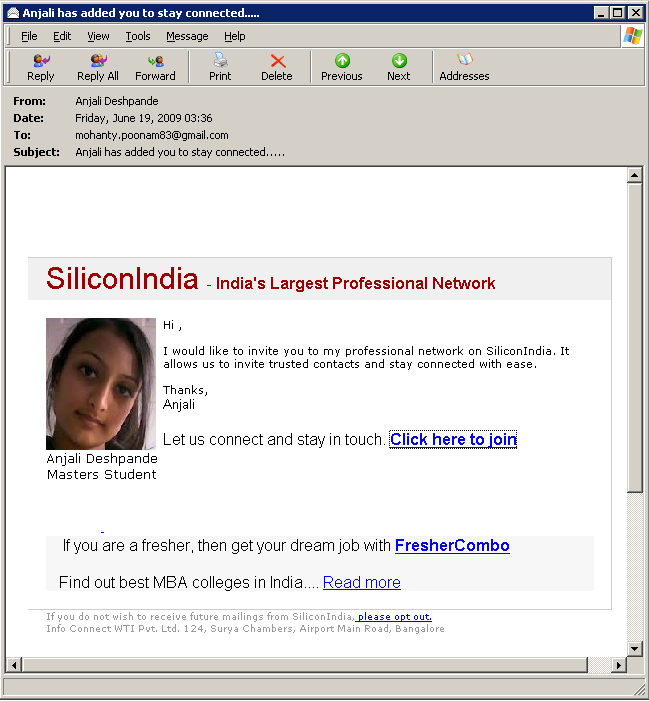
“…, has added you as a friend on SiliconIndia” scam emails

Over the past year I’ve been getting a steady trickle of “friend requests”, i.e. invitations to join a service, for a website called SiliconIndia. Virtually all the supposed senders were women from India. Job titles included Software Engineer, Business Analyst and HR Executive. Most were very pretty. By that I mean not just better than average looking, more like the portfolio of a modeling agency.

Because of my volunteer work against online scams, some email accounts of mine end up in address books of thousands of people who over time have forwarded me samples of questionable mails. Consequently, I also receive a lot of requests to join online networking and other websites, many of which make it too easy to invite everyone in your address book to join a particular service when you join. One mail folder that I keep exclusively for such invitations from people I don’t recognize currently contains over 1,100 examples.

When I received another SiliconIndia invitation yesterday, I decided to take a closer look and a very interesting picture evolved. I had 42 invitations going back to February 2008. Nine of them (originating with three indivuals) did not include a photograph and almost all of those were from the first month. They may have been real invitations. The interesting thing about the other 33 invitations was that the senders were all female. Not one guy! 23 of these were sent from Gmail accounts and 10 from AOL or AIM accounts. One picture I received from both a Gmail and an AOL account. It wasn’t just that these emails had AOL or Gmail sender addresses, they also did not come from a SiliconIndia mail server as one might expect for regular “tell a friend” invitations. All were sent from regular personal Gmail and AOL accounts through the respective mail servers.

What this tells me is that someone is manually making up invitation mails, using pictures of pretty women to attract mostly male job seekers to join that service. And somebody somewhere is making money out of people who respond.

Out of curiosity I joined the service under an assumed identity. The profile for the person who had invited me the day before had a list of 456 “friends”. If she were to “stay in touch” with all of them as it said in the invitation, she’d be a pretty busy lady. So next time you get an invitation to join SiliconIndia to connect with some pretty woman, don’t delude yourself. Most likely some guy somewhere is being paid a few rupees to mail pictures of pretty girls to thousands of guys in order to drive traffic to a commercial website.

“Trau keiner Statistik…”

Today, in online chat with an American friend that touched on website statistics I posted the line:

“Never trust any statistics that you didn’t forge yourself.”

He replied that he liked the quote, which suggested to me that he hadn’t heard it before. This particular one liner frequently pops up in discussions of published numbers in Germany, especially if one disagrees with what they appear to show. You might call it the German equivalent of “There are three kinds of lies: lies, damned lies, and statistics.” Its two common variants are “Ich traue keiner Statistik die ich nicht selbst gefaelscht habe” (I don’t trust any statistics that I didn’t forge myself) or as advice: “Traue keiner Statistik die du nicht selbst gefaelscht hast” (Don’t trust any statistics that you didn’t forge yourself).

I vaguely remembered that this line was usually attributed to Winston Churchill and found my friend’s reaction odd, because if this was a Churchill quote, it would be more likely to be known amongst English speakers than in Germany. A quick Google search confirmed my suspicions because hits centered on Germany, making it unlikely the quote was indeed from Churchill. The German-centric hits were no coincidence, because as it turns out the “quote” was a product of Nazi propaganda that has managed to survive the fall of the Reich by more than six decades.

According to research conducted by a member of the Baden-Wuerttemberg State Office of Statistics a couple of years ago, there is no verifiable source for the supposed “quote”. The Times of London had never heard of it. What’s more, it dovetails nicely with WWII Nazi propaganda that accused Churchill of exaggerating Allied successes and minimizing British losses (i.e. forging numbers). It does not really fit Churchill, because he was not known as a general skeptic on statistics, though he was suspicious of German claims (and for good reasons). The fake “quote” combines these two themes, skepticism of his opponents’ statistics and accusations of being a liar that the Nazis liked to smear him with.

Maybe better advice would be: “Don’t trust any quote that you didn’t forge yourself.” 😉

Sources: